
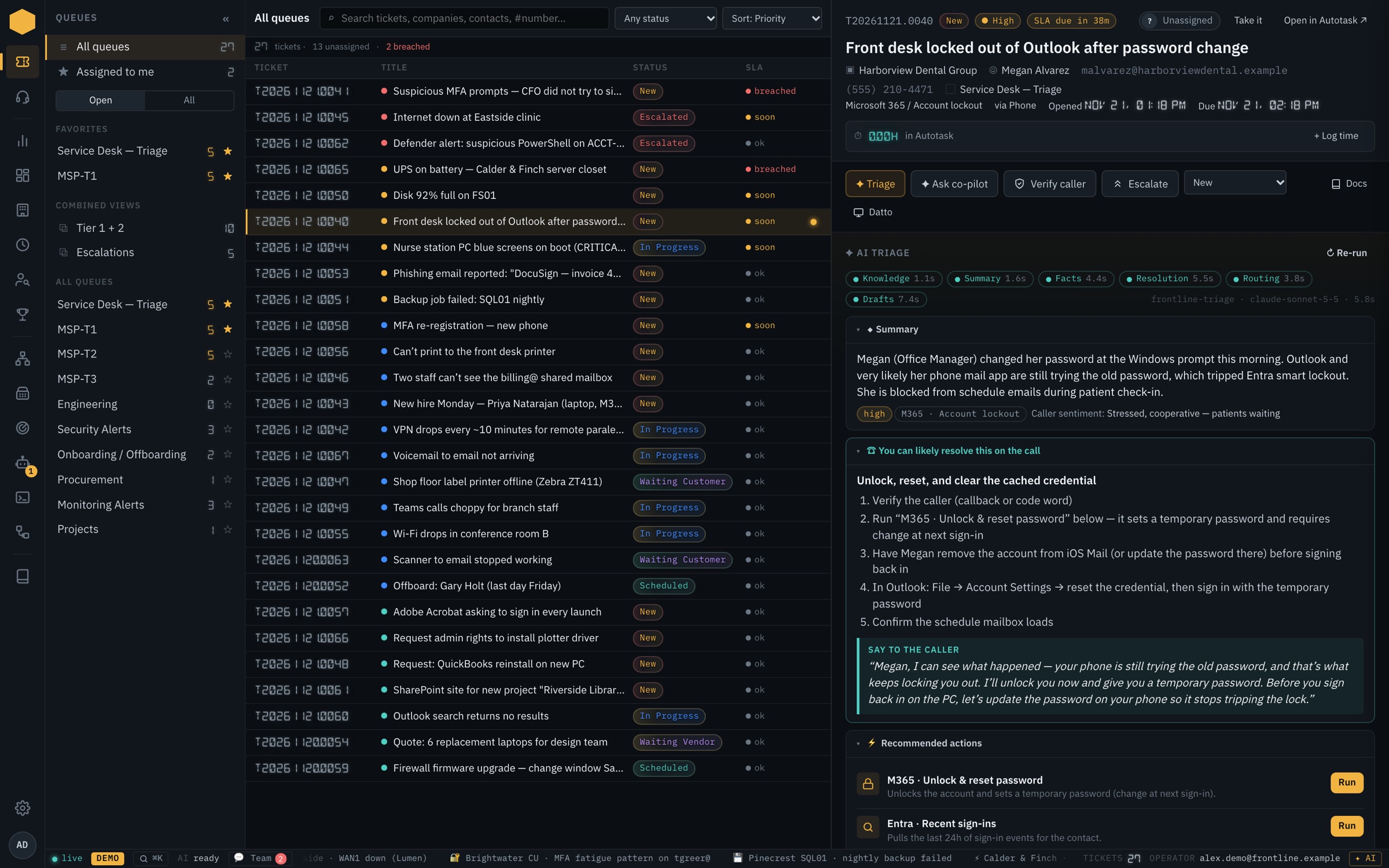
One-click AI triage
Labeled sections you can act on: key facts, data to collect, a do-it-now resolution with a customer script, risk flags, and a draft note and reply.
For MSP service desks on Autotask
Frontline is a keyboard-fast triage console that sits in front of Autotask with an AI co-pilot. Your front line can size up a ticket, fix what they can while the caller is still on the line, and hand the rest to the right tier with a clean note.
Why Frontline
Hiring more tier-1 staff doesn't fix it. Making the first touch decisive does: simple work gets closed at the front desk, and hard work arrives already triaged.
How it works
One loop, run all day. Every tool in Frontline exists to finish it on the first touch, and Autotask stays the system of record the whole way through.
Every Autotask queue you can access, with live open-ticket counts and the newest work first.
A normalized ticket: status, priority, SLA pressure, contact and the full activity stream.
Summary, urgency, sentiment, what to ask the caller, a do-it-now fix and a suggested escalation.
Talk to the customer with a co-pilot that already knows this ticket. Collect what you need before you hang up.
Note, status, reassign, escalate or run a tool. Each one is written back to Autotask a moment later.
Nothing lives only in Frontline. Autotask stays the source of truth, and if the AI is unavailable the whole loop still works without it.
Features
Every capability answers the same question: can we close this on the first touch instead of escalating it?
Labeled sections you can act on: key facts, data to collect, a do-it-now resolution with a customer script, risk flags, and a draft note and reply.
T1, T2, T3 or Engineering. One action moves the queue, records the tier and adds a handoff note, so context goes with the ticket.
Notes, status, reassignment and escalation stay in sync. Reporting, billing and contracts stay where they are.
A browser phone that pulls up related tickets and runbooks during the call and drafts the subject and description for you.
Unlock accounts and reset passwords across customer tenants with per-action scopes, caller verification and an audit log.
AI-proposed, operator-approved checks on the customer's actual device. No one gets a blank remote shell.
Send secrets behind a code, MFA and an expiry. Collect missing details with an AI-drafted form whose answers land in the ticket.
Build a workflow once and run it across customers, with approvals and full history. Destructive steps need two keys.
j/k to move, t to triage, n for a note, e to escalate, ⌘K to jump anywhere.
For owners and service managers
The actions that resolve tickets also produce the numbers you manage by. Nobody has to follow a separate time-tracking routine.
The rule everything follows
The AI recommends. Your people execute.
Offboarding, MFA resets and account deletes need a deliberate second confirmation.
Every tool run is saved to the ticket under the operator's name and recorded in an audit log.
A password reset has password permission and nothing else. Cross-tenant writes need an explicit target.
Push approval or a voice keypress before any sensitive action. An SMS or email code doesn't count.
The console sits behind single sign-on, and every API call is checked against a signed token.
Autotask, AI and Microsoft 365 credentials never reach the browser. One-time passwords are shown once and never stored.
FAQ
No. Frontline is a faster surface on top of Autotask. Every note, status change, reassignment and escalation is written back, and reporting, billing and contracts stay in Autotask.
In the operator console, no. It recommends and a person executes. Autonomous work is opt-in, limited to its own queue, runs behind a kill switch, and parks finished work for human review.
Triage sections run independently, so one can fail while the others still appear. If the AI is unavailable, operators still have the full ticket and every write-back action.
Autotask PSA as the system of record, Microsoft 365 and Entra for do-it-now actions, and Datto for contacts. Talk to us about the rest of your stack.
Watch the share of quick wins in Impact & Effort, SLA attainment and median first response. The data is recorded when each ticket is completed, so before-and-after comparisons are straightforward.
Contact
Want a demo, pricing, or to find out whether Frontline fits your service desk? Send us a note and a real person at Dual Path will get back to you.